
Honda Fit: Tire and Loading Information Label
The label attached to the driver’s doorjamb provides necessary tire and loading information.
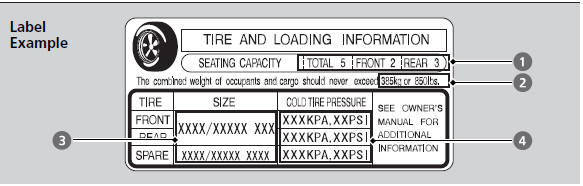
The tire and loading information label attached to the driver’s doorjamb contains: 1 The number of people your vehicle can carry.
2 The total weight your vehicle can carry. Do not exceed this weight.
3 The original tire sizes for front, rear, and spare.
4 The proper cold tire pressure for front, rear, and spare.
See also:
Voice Control Operation
1 Press and release the (Talk)
button.
A helpful prompt asks what you
would like to do. Press and release
the (Talk) button again to bypass
this prompt.
► The icon is displayed and ...
EPS Control Unit Removal/Installation
Do the battery terminal disconnection procedure.
Remove the under-dash fuse/relay box.
Disconnect EPS control unit connector A (11P) and connector B (16P) by
pus ...
Front:
@font-face{font-family:
"Honda_SymbolMarkeng";src:url(/statics/ho_prod_2/txt/Honda_SymbolMark_enu3.txt);}@font-face{font-family:
"Ho ...
Categories
