
Honda Fit: Front Turn Signal Light Bulbs
When replacing, use the following bulbs.
Front Turn Signal Light: 21 W (Amber)
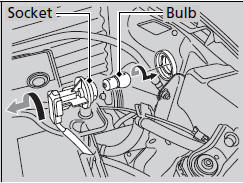
1. Turn the socket to the left and remove it.
2. Push in the old bulb, rotate to the left until it unlocks, and remove.
3. Insert a new bulb.
See also:
Rear Seats
Adjusting the Rear Seat-Backs
Pull the lever on the right to change the angle
of the right half of the seat-back, and left for
the left half.
Folding Down the Rear Seats
1. Unlatch the detach ...
VIN, Engine, (Motor), Transmission Numbers, and Paint Codes
Vehicle Identification Number
a.
Manufacturer, Make, and Type of Vehicle
JHM:
Honda Motor Co., Ltd.
Honda passe ...
Seat Belt Inspection
Regularly check the condition of your seat belts as follows:
• Pull each belt out fully, and look for frays, cuts, burns, and wear.
• Check that the latches work smoothly and the belts retract e ...
Categories
