
Honda Fit: Transmission Side - Release Bearing Removal
Second generation (2007-2026) / Honda Fit 2007-2026 Repair Manual / Powertrain / Transmission/Transaxle / Manual / Clutch Replacement (M/T) / Transmission Side - Release Bearing Removal
-
Remove the transmission.
-
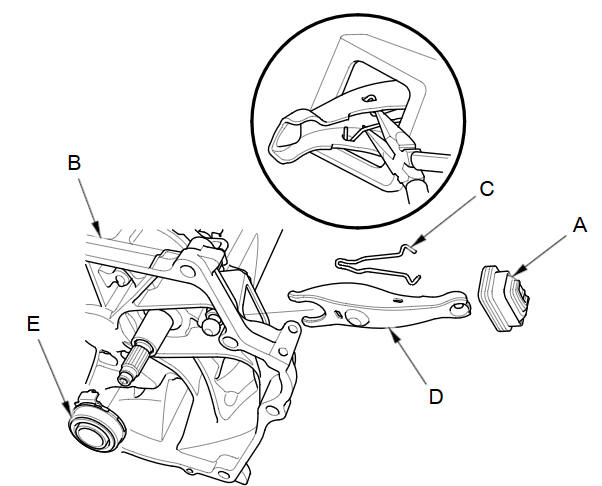
Remove the release fork boot (A) from the clutch housing (B).
-
Squeeze the release fork set spring (C) with pliers to remove the release fork (D) from the clutch housing. Remove the release bearing (E).
See also:
Brake System
Parking Brake
Use the parking brake to keep the vehicle stationary when parking.
To apply:
Pull the lever fully up without pressing the
release button.
To release:
1. Pull the lever slightly ...
Body
...
Categories

© 2026 Copyright www.hfitinfo.com